


Modular Medieval Town & Monastery Environment
Modular Medieval Monastery and Town Environment is a complete, production-ready Unreal Engine 5 environment pack designed to create breathtaking medieval worlds from concept to final publish. Featuring a highly detailed modular architecture system, ready-to-use buildings, and a vast 16 km² Central European biome and Town Environment included, this pack empowers developers and filmmakers to build immersive cinematic scenes, next-generation games, and historical documentaries with ease.
Optimized with Nanite-ready geometries and advanced Pivot Painter 2 wind support, every asset delivers maximum realism, performance, and flexibility. Whether you are creating atmospheric monasteries, authentic medieval towns, or expansive open worlds, this environment provides everything needed to achieve professional-quality results in Unreal Engine 5.
Overview - Maps
The pack includes a dedicated Overview Map that clearly presents all assets and their variations, allowing users to quickly explore the full content of the environment. A separate Buildings Map showcases a wide range of premade modular building assemblies, demonstrating how assets can be efficiently combined to create complete medieval structures.
Additionally, the pack features two similar fully prepared environment maps and asset ecosystem: a 2 km² map, ideal for smaller projects, fast iteration, and cinematic production, and a massive 16 km² open world map, designed for large-scale games, expansive exploration, and high-end cinematic scenes. Both maps provide a ready-to-use foundation for immediate production.


Map_Monastery_2km
Map_Buildings_Instanced Static Mesh

Map_Buildings_ISM
Overview - Modular Kit
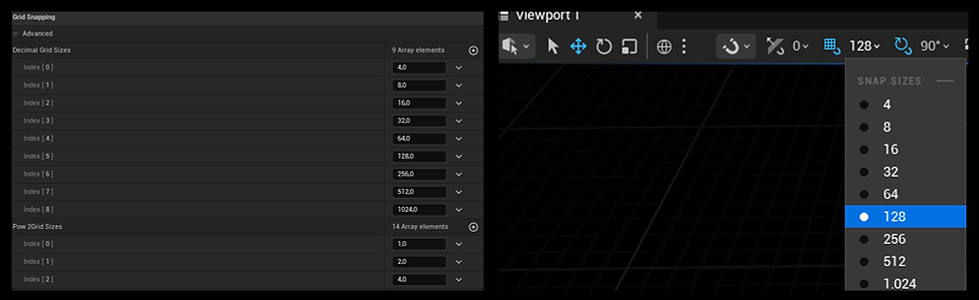
The modular architecture kit is built on a precise 128 cm grid system, fully aligned with Unreal Engine’s power-of-two grid standards and optimized to match character scale. This ensures seamless snapping, perfect proportions, and effortless assembly. All modular pieces are designed to work flawlessly together, allowing users to quickly create a wide variety of authentic medieval structures — from small town houses and village buildings to large monasteries, churches, and castles.
Each architectural module has been carefully crafted with a consistent Central European medieval style, ensuring visual harmony across all building types while maintaining maximum flexibility and creative freedom.

To fully utilize the modular system, we recommend adjusting the editor grid settings. Go to Editor Preferences → Grid Snapping and enable power-of-two grid sizes such as 4, 16, 32, 64, 128, and 256 cm. This allows all modules to snap perfectly into place and enables users to assemble complete buildings and architectural layouts within minutes.
This modular workflow dramatically accelerates production, making it easy to create unique, large-scale medieval towns and environments with professional speed and precision.
Overview - Trees
The pack includes four authentic Central European tree species: Poplar, Birch, Willow, and Maple, carefully designed to create rich and believable medieval landscapes. Both Poplar and Birch trees feature multiple variations, ranging from young saplings to large, mature, and giant specimens, enabling natural environmental diversity and realistic forest composition.
All trees are fully optimized for Unreal Engine 5 with Nanite support, allowing extremely high geometric detail without compromising performance. Each asset also includes Pivot Painter 2 integration, enabling realistic wind animation and natural foliage motion.
Tree assets feature high-quality geometry with triangle counts ranging from approximately 400,000 to 1,200,000 triangles, delivering cinematic-level detail suitable for close-up shots, next-gen games, and large-scale open worlds.

Overview - Wind Effect
All tree and plants wind animations are fully controllable through the centralized MPC_WindTree Material Parameter Collection / MPC_WindPlant, providing global control over wind intensity, direction, and behavior. To access these settings, simply search for “MPC_WindTree”/ ''MPC_WindPlant'' in the Content Browser. This allows you to adjust the wind parameters of all tree and plant assets simultaneously, ensuring fast and consistent environmental control across your entire scene.


Landscape layer setup
-
Go to the landscape folder in content browser and select the MI_MM_Landscape. Drag it to the landscape details panel material input.
-
Go to the Landscape Editor, from paint tab, create landscape layer info for each landscape layer.
-
After these steps landscape material is applied to the landscape.

Landscape Grass

Grass Mesh
You can change the grass model by dragging and dropping any Static Mesh into the Grass Mesh slot.
Grass Density
The Grass Density parameter controls how many grass instances are spawned.
Higher density creates a fuller look but reduces performance. For better performance, use lower density values.
Scale X
The Scale X parameter controls the size variation of the grass meshes.
Increasing the value makes the plants larger, while decreasing it makes them smaller. This helps create more natural variation.
Distance Field and Dynamic Shadows
Enabling Distance Field Lighting and Cast Dynamic Shadow improves visual quality but increases performance cost.
For better performance, disable both options and enable Contact Shadows in your Directional Light instead.
Instance World Position Offset Disable Distance
This parameter controls the distance at which the World Position Offset (wind animation) is disabled.
Lower values improve performance because World Position Offset and Nanite both add rendering cost.
However, decreasing this value also reduces the visible wind animation distance on the grass.

PCG_Procedural Content Generation
In order to use PCG Volumes in the scene, Procedural Content Generation Plugin should be enabled in Plugin settings.

PCG_Biome Volume + Soil2
Paint = Procedural Field Trees
PCG_Biome Volume + BaseGrass
Paint = Procedural Area Forest Trees
PCG_Spline Volume + BP_FarmlandBoundaries
Spline = Farmland Fences
PCG_GrapeWine Volume +
BP_GrapeWine
Spline = Grape Wineyard
The PCG (Procedural Content Generation) system can be found inside the Content Browser under the PCG folder. This system allows you to procedurally generate vegetation, crops, fences, and other environmental assets using volumes, splines, and configurable parameters.

If the Procedural Content Generation (PCG) Volume reduces performance while you are editing the scene, you can disable automatic regeneration.
Go to the PCG Details panel, turn off Regenerate PCG Volume in Editor, and set the Generation Trigger to Generate On Demand.
With this setting, the PCG will only generate content when you manually trigger it, preventing performance drops while you sculpt or paint the Landscape.
Whenever you want the PCG to update according to your latest Landscape changes, simply press the Generate button. The PCG will then place trees and vegetation based on the updated Landscape.

PCG_Overview

Level Design from start to finish

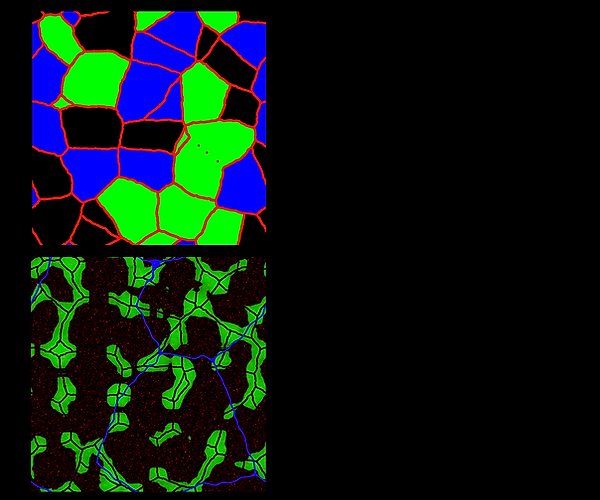
T_Landscape Mask_02
Red channel : Mudroad layer for roads
Green channel : Farmland1 layer for farmlands
Blue channel : Farmland2 layer for farmlands
T_Landscape Mask_01
Red channel : DryGrass layer to add variation to main landscape
Green channel : Soil2 Layer for PCG_Biome and generate Trees
Blue channel : Mudroad Layer to generate bigger roads


We have disabled Tangent space normals for plants and the trees to achieve more homogenous lighting for the foliage. If you change enable tangent space normal, normals and
shadows of the plants and trees would be more realistic. For close-up shots enable tangent space normals.
Water Material
To enable all water features, Generate Mesh Distance Field option should be enabled in Project Settings

Lighting

Performance Tips

Foliage Performance Optimization
The following settings can help improve performance when using dense foliage and landscape grass in large environments.
1. Disable wind animation at far distances
Wind animation using World Position Offset can be expensive when applied to large amounts of foliage.
To optimize this, open your Landscape Grass Type asset and set:
Instance World Position Offset Disable Distance
This disables wind animation for distant foliage where the movement is no longer noticeable, reducing unnecessary vertex calculations.
2. Disable dynamic shadows for grass
Dynamic shadows on dense grass can have a significant performance cost.
Inside the Landscape Grass Type settings, disable:
Cast Dynamic Shadow
Grass usually does not require full dynamic shadows, and disabling them can greatly improve performance in large outdoor scenes.
3. Use Contact Shadows as a lightweight alternative
To maintain subtle shading after disabling dynamic shadows, contact shadows can be used as a lightweight solution.
Select your Directional Light and set:
Contact Shadow Length = 1
Contact shadows help create small local shadow details near objects, providing a convincing shading effect without the heavy cost of full dynamic shadows.
Result
By applying these optimizations:
-
Wind animation is disabled for distant foliage
-
Expensive dynamic shadows on grass are removed
-
Lightweight contact shadows preserve visual depth
These changes can significantly improve performance in foliage-heavy environments while maintaining a natural visual appearance.
Movie Render related questions
1. Disable Grass Flush Streaming in Game Overrides settings in Movie Render Queue
2. Increase start and end cull distances from Landscape Grass Type assets
Important Settings before Migrating package into your Project
Before adding this environment pack to your project, we recommend enabling the following Unreal Engine settings to ensure the environment renders correctly and performs as intended.
1. Enable Procedural Content Generation (PCG)
This environment pack uses Unreal Engine’s Procedural Content Generation system to scatter vegetation and environment assets.
Before using the PCG volumes in the demo scene, make sure the PCG plugin is enabled.
Steps
Go to:
Plugins → Search for Procedural Content Generation
Enable:
Procedural Content Generation Framework
2. Enable Nanite Support
Most meshes in this pack use Nanite geometry for higher detail and better performance.
Path
Project Settings → Rendering → Nanite
Enable:
Support Nanite
Restart the engine after enabling this option.
3. Enable Lumen Global Illumination
The lighting setup of the demo scene uses Lumen for global illumination and reflections.
Path
Project Settings → Rendering → Global Illumination
Set:
Dynamic Global Illumination Method → Lumen
Reflection Method → Lumen
4. Enable Generate Mesh Distance Fields
Some materials and ambient occlusion effects may rely on Mesh Distance Fields.
Path
Project Settings → Rendering
Enable:
Generate Mesh Distance Fields
Restart the engine after enabling this setting.
5. Enable Virtual Textures (Optional)
If you plan to use the environment with large landscapes, enabling virtual textures can improve performance.
Path
Project Settings → Rendering → Virtual Textures
Enable:
Virtual Texture Support
6. Enable Virtual Shadow Maps
This environment was designed to work with Virtual Shadow Maps, which provide more stable and detailed shadows for Nanite assets and foliage.
Path
Project Settings → Rendering → Shadows
Enable:
Virtual Shadow Maps
Thank you
